High-Tech World. Making presentation in English
| Сайт: | Навчально-інформаційний портал НУБіП України |
| Курс: | Іноземна мова (англійська) (КН). Ч3 ☑️ |
| Книга: | High-Tech World. Making presentation in English |
| Надруковано: | Гість-користувач |
| Дата: | четвер, 9 квітня 2026, 19:04 |
1. Making presentation in English
Plan a perfect presentation in English

At some time or other, most of us will have to give a presentation. The idea of speaking in public can be frightening enough if you're a native English speaker, but it's even more so if English is your second language. These eight tips will help you plan a perfect presentation.
To give an effective presentation, you need to know something about your audience. How good is their English? How much do they know about the subject of your talk? Why will they be interested in listening to you? It’s a good idea to find out who is attending your presentation so that you can make the information relevant and interesting to them. For example, a presentation on your company’s financial results to financial analysts will focus on results, reasons and analysis. A presentation on new auditing software will focus on the benefits and features of the software.

Also ask yourself what you want to achieve from your presentation. Sales presentations are different from information-giving presentations, for example. It’s always a good idea to work out what you want your audience to think or do at the end of your talk, as this will help you focus on the language and content of your presentation.
The first minute of your presentation is crucial. In this time you should interest your audience and give them a reason to listen to you. What you say in the first minute depends on your audience and their interests, but it must mean something important to them. Perhaps it is a problem that you know how to solve, or a fact or statistic that they need to know.

You’ll need to make sure the room is big enough for the number of people attending, and that you have all the equipment you need. Find out when you are giving your presentation – your audience may be less attentive if it’s right before lunch or at the end of the week and you’ll need to make especially sure that the presentation is interesting if it’s at a difficult time.
Planning helps you focus on your presentation goals, and minimises the chances of anything going wrong.
If you know who you are talking to and why you are talking to them, you can put yourself in your audience's position. You can decide what information to include and how to order it.
Aim to speak for no longer than 30 minutes, and leave time for questions and answers at the end. Remember that it’s difficult to absorb lots of new information, so don’t aim to include too much.
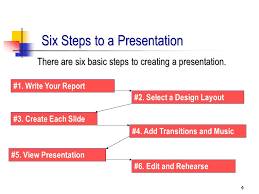
Many presentations are divided into five areas:
a) The introduction (Get someone else to introduce you to the audience. This gives you credibility as a speaker and means that you don't have to waste time telling people who you are and why you are there) b) The overview c) The main body of the presentation d) Your summary e) A question and answer session
Make brief notes about all the points you want to make in your presentation and make a plan. Organise your presentation into main points and supporting evidence.
During the presentation, remember that it is a good idea to refer back to your opening statement and remind your audience why they are listening to you.

Put your points on individual index cards to help you during the presentation. If you put the key words onto cards (1 card for 1 key word or point) you can refer to them at any time if you forget where you are in the presentation.
Use your index cards for any words that you might find difficult to remember, or words that are difficult to pronounce.
You can also use the index cards to write the links between points, such as: “this brings me to…” “now I’d like to move on to..” “Right…”

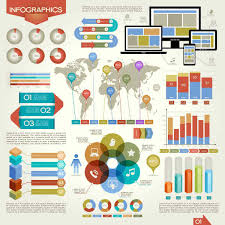
Don't put too much information in visuals and only use them to illustrate information that would otherwise take too long to explain.
Simple graphic visuals such as pie charts and bar graphs work better than visuals with lots of labelling or words. Use colour and different fonts to help information stand out.
Practise your presentation as often as you can using your index cards. By practising, you will know how long it will take, and where the difficult areas are in your talk. The more you practise, the more confident you will feel!
You're likely to have questions at the end of your presentation, so try to think of some in advance, as well as possible answers. The more you prepare these, the better you'll feel able to deal with them.

2. High-Tech World
They are Watching You
In his classic novel 1984, which was written in 1949, British author George Orwell wrote about a future society where it is impossible to hide from surveillance by the government. In the novel, people are constantly reminded of the government's presence by the phrase 'Big Brother is watching you'.

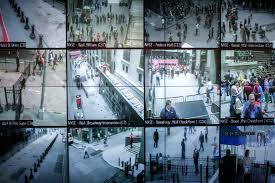
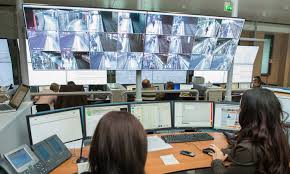
The world of surveillance that was predicted by Orwell is already here. Public video systems are now used in many cities around the world. In Paris, France, for example, there are road cameras nearly everywhere to help control traffic and approximately 2,000 cameras on city buses to deter crime. In Britain, there are cameras watching streets and parks, public transport, stadiums and shopping areas. With more than four million cameras - that's one camera for every 15 people - Britain has more surveillance cameras than anywhere else in the world. In fact, some researches have estimated that most visitors to London are now caught on video 300 times in a single day.
So who's watching? The police, certainly. When it comes to catching the bad guys, a surveillance camera is a police officer's best friend. There is little a criminal can say when the crime he has committed has been caught on video.
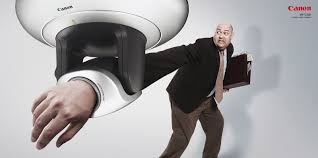
Even when criminals are not actually caught on video, just the presence of video cameras can make a location safer. Hoping to deter criminals, some people put up signs that say 'Video Surveillance is in Operation' ever where no video cameras exist. However, how effective the cameras are at preventing crime is nor clear. Studies show that video surveillance has been successful in greatly reducing crime in some areas, but has had little effect in other areas.
Fighting crime hasn't been the only success for video surveillance. It has also been used to prevent accidents and even to save lives. One day in France, 18-year-old Jean-Francois LeRoy was swimming in a public swimming pool. While he was under water, he lost consciousness. The human lifeguards watching the pool didn't realise what was happening as LeRoy sank slowly and quietly to the bottom of the pool. Without help, it would have taken him as little as four minutes to die.
Although no human lifeguard saw LeRoy drowning, 12 large machine eyes deep under the water were watching and sending the images to a central computer. Just nine months earlier, a modern electronic surveillance system called Poseidon had been installed. Poseidon covers a pool's entire swimming area, and is able to tell when swimmers are not moving the way they should be. When the computer detects a problem, it sets off an alarm to alert lifeguards. Just 16 seconds after Poseidon noticed that LeRoy was sinking, the lifeguards pulled him from the pool. Poseidon has saved his life.
Although it is useful for fighting crime, many people are still concerned about public surveillance. Norman Siegel, an American lawyer, says that there has been a huge increase in video surveillance in public spaces without any real discussion about the advantages and disadvantages. He believes that people should be asked to vote on whether they agree or disagree with public surveillance.
Whether or agree with it or not, the fact is that we live in a world where surveillance surrounds us all.
Шрифти
Розмір шрифта
Колір тексту
Колір тла
Кернінг шрифтів
Видимість картинок
Інтервал між літерами
Висота рядка
Виділити посилання
Вирівнювання тексту
Ширина абзацу